Skip to content

Trading Cards Operating System · for shops, sellers and enthusiasts

Trading Cards Operating System

Every card, from bulk to sale.

The operating system for card shops and sellers. Every card tracked: what it cost, where it sits, what it earned.

Don’t take our word for it. Follow a lot from the first photo to the sale in the guided demo.

Try the demo · simulation

Simulated data and behavior, for illustration only.

Beta open now · We approve every request by email

Card record

Sample data
BEAST · EMBER WARDEN170CinderwardenKindle Oath30When it enters play, warm up to two of your cards.Slag Rush60Deal two damage to a card in play.It keeps the old forges lit, and the old debts too.SGX · 001/120Tam Ellery
Card
Cinderwarden
Set
SGX · 001/120
Condition
NM
estimate
Place
Binder A · sheet 3 · slot 4
Status
Approved
  • Your phone is the scanner
  • Up to 100 photos per batch
  • A place for every card: binder, sheet, slot
  • Cost and margin, card by card
  • Sell at the kiosk and on CardTrader
  • Pokémon today, in 7 printed languages; other games on the way

The problem

Four questions a box of singles can’t answer.

  • “Where did I put it?”

    A customer asks for a card. You know you have it. You don’t know which binder it’s in.

  • “Did that lot pay off?”

    You paid €150 for a collection. Three weeks on, you can’t say how much has come back, or from which cards.

  • “When do I price all this?”

    Set, number, variant, language, condition, price. One card at a time, after closing time.

  • “How do customers see what I have?”

    Your catalog is the binder on the counter. One customer at a time, and only if you hand it over.

Scangrade keeps one record for every card: what it is, what it cost you, where it sits, what it sold for.

How it works

Five modules. One record per card.

That’s what we mean by operating system: one place that runs your singles from the moment a lot comes through the door. Each module matches pages you’ll find in the app, and what you confirm in one is there in all the others.
01

Scan

Photograph the lot. Say what you paid.

Your phone is the scanner: point it at the QR code on your computer screen and start shooting. Nothing to install, no sign-in on the phone. Or drag in the photos you already have.

  • One card per photo, or one photo per binder page with FAST grid, cut into single cards for you.
  • Lot cost: enter what you paid for the whole lot. Scangrade splits it across the cards, by market value or in equal parts.
  • A box that’s all the same? Set language and condition once for the whole batch. Which card is which still comes from the photo.
  • Slurper: scan a whole lot straight into one binder or box, a few cards at a time.

Good to know

With FAST grid the condition estimate is less precise. Shoot the cards that matter one by one.

On the record
Proposed identity · condition estimate · cost
In the app
Card scan · Slurper

Card scan

Sample data
Sample card, drawn in code: CinderpawSample card, drawn in code: Cinderpaw
Sample card, drawn in code: RipplebackSample card, drawn in code: Rippleback
Sample card, drawn in code: GlaceletSample card, drawn in code: Glacelet

Your photos

Source
Phone · QR on screen
Lot cost
€12.00 · by market value
Batch
Italian · LP, set once
02

Review

Scangrade proposes. You decide.

Nothing enters your inventory until you approve it. Scanned cards wait in the Backlog, each with your photo next to the catalog card.

  • Set, number and printed language are proposed from the photo. Wrong match? Pick the right card from the alternatives, or search the catalog yourself.
  • The condition comes as an estimate on the M / NM / LP / MP / HP / DMG scale, with the defects found and a short note.
  • When two printings share artwork and number and the match is too close to call, the card is flagged “Possible reprint”. You check the set symbol and decide.
  • Approve one card at a time, or select many and approve them together.

Good to know

The condition is an AI estimate, not a professional or certified grading. If you disagree, change it: yours is the one that counts.

On the record
Confirmed identity · variant · language · condition
In the app
Backlog

Backlog

Sample data
Sample card, drawn in code: CinderpawSample card, drawn in code: Cinderpaw

Your photo

Sample card, drawn in code: CinderpawSample card, drawn in code: Cinderpaw

Catalog card

Condition
LP
estimate
Variant
Reverse holo · your pick
Check
Possible reprint
03

Store

A place for every card.

Approved cards land in Your Cards with their cost, their condition and their market value, when there is one. Then you give each card a physical place.

  • Binders with sheets and slots, boxes, drawers, showcases. “Place remaining” fills the free slots of a binder in one go.
  • Search a card by name or SKU and read where it sits: binder, sheet, slot.
  • A QR code for every storage unit. An SKU with a barcode for every card, and a label you can print from the browser.
  • Every card keeps its history: what happened, and who did it. The system, the AI or you.

Good to know

Market values update once a day and can be missing for some cards.

On the record
Place · market value · your sale price · SKU · history
In the app
Your Cards · Storage

Storage

Sample data

Binder A · sheet 3

  • A1
    NM
  • A2
    NM
  • A3
    LP
  • B1
    MP
  • B2
    LP
  • B3empty
  • C1
    NM
  • C2empty
  • C3empty
Card
Cinderpaw · 021/120
Place
Binder A · sheet 3 · B2
SKU
SG-K7Q2MX-000042
Label
Barcode · ready to print
04

Sell

Sell at the counter and online.

In the shop, the kiosk is your catalog on a tablet or PC: customers search, filter and fill a cart on their own. They show you a QR code. You scan it with your phone and see each card with its storage position. Adjust a price, apply a discount, confirm: the cards leave your inventory as sold.

  • The kiosk shows your sale price where you set one, the market value otherwise, and “Price on request” when there’s neither.
  • No kiosk? Take the card out of your inventory, enter what you were paid, and the sale is on record with its margin.
  • CardTrader: publish from the card’s page. When it sells, the card leaves your inventory and shows up in Sales, with a notification.
  • What you paid never shows on the kiosk or on any public page.

Good to know

The kiosk shows every approved card in your inventory, not only the ones you marked “For sale”.

On the record
Sale price · listing · sale
In the app
Listings · the kiosk opens on its own screen

Kiosk order

Sample data
  • Cinderpaw · 021/120Binder A · sheet 3 · B2€4.50
  • Rippleback · 033/120Box 2€6.00
Total
€10.50
Status
Sold
05

Measure

See the margin, not just the revenue.

Every sale is logged with what you paid, what you took and the margin, in value and in percent.

  • Revenue, cards sold and inventory value over 7, 30 or 90 days.
  • Inventory turnover. Best-selling cards and sets.
  • Stock aging: what has been sitting for under 30 days, 30 to 89, 90 to 179, 180 or more.

Good to know

No cost on a card? The margin stays blank. It never shows as zero.

On the record
Sale price · cost · margin
In the app
Sales · Analytics

Sales

Sample data
CardPaidSoldMargin
Cinderpaw€2.40€4.50+€2.10
Rippleback—€6.00—
Glacelet€1.10€3.00+€1.90
Revenue · 30 days
€13.50
Margin · 30 days
+€4.00

Scan it once. Follow it to the sale.

Demo

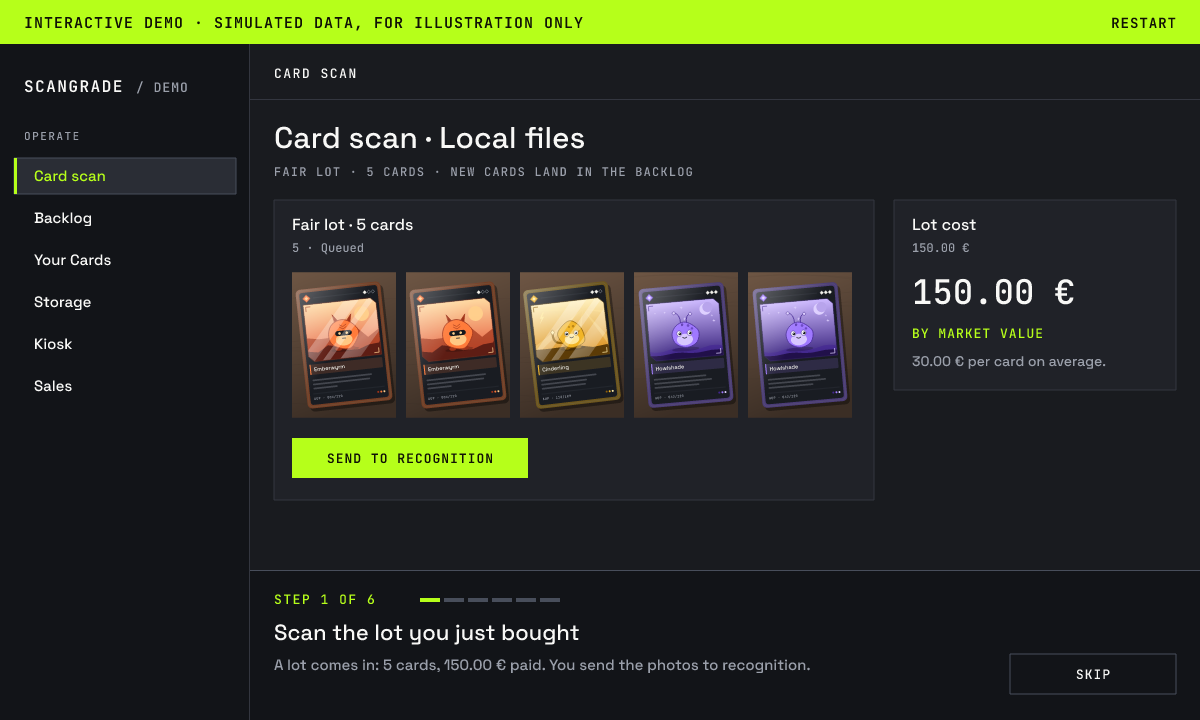
Follow one lot from the first photo to the sale.

A guided tour that looks and moves like the app. A lot comes in, you fix a wrong match, see what each card cost you, put the cards away, sell one at the kiosk and find it in Sales with its margin. It opens here in the page, with no sign-up.

This demo is a simulation. Cards, prices and results are sample data, and every step is scripted. It is for illustration only: it does not recognize real photos, and the real app can look and behave differently.

Preview of the guided demo: the simulated web app under the notice “Interactive demo · simulated data, for illustration only”.

Simulated data and behavior, for illustration only.

What the demo shows

  1. Scan the lot you just bought

    A lot comes in: 5 cards, 150.00 € paid. You send the photos to recognition.

  2. Review before it enters your inventory

    Each card comes back with a proposed match and a condition estimate. One is the wrong print: you pick the right one, then approve them all.

  3. What each card cost you

    What you paid is now split across the cards. One has no market value: it takes the average share.

  4. Give every card a place

    One click fills the free slots of a binder. One card lands in B1.

  5. A customer buys at the kiosk

    A customer puts that card in the cart. You read where it sits, take 10% off and confirm.

  6. The margin, card by card

    Sold. What you paid, what you took, your margin.

Who it’s for

Built for shops and sellers. Open to enthusiasts.

For shops

The counter, the back room and the numbers. One system.

You buy collections, you sell singles, and the customer is standing right there.

A lot just came in.
Scan it. Scan history shows its total market value and how many cards have a price. Enter what you paid and every card carries its share of the cost.
A box of commons, all the same language, all played.
Choose language and condition once for the whole box; the photos tell the cards apart.
A customer asks for a card.
Search it, read the slot, pull it out.
Saturday afternoon, shop full.
Customers browse the kiosk and build their cart while you serve someone else. You close the order from your phone.
They ask for a discount.
Change a price or discount the whole order, as a percentage or a fixed amount, before you confirm. The sale is recorded at what you actually took.
You sell a card over the counter, no kiosk.
Record it as sold with what you took; the margin shows up in Sales.
End of the month.
Margin by card, revenue, turnover, and the stock that isn’t moving.
Your buying prices.
Private. Always.

For sellers

Less typing, clearer margins.

You sell online, and every listing starts with a card to write up by hand.

  • From photo to a card ready to list: set, number, language, condition estimate and market value, after your review.
  • CardTrader: publish from the card’s page, with the price pre-filled from the market value when there is one. When it sells, the card leaves your inventory and lands in Sales.
  • The cost of each card, from what you paid for the lot. The margin on every sale.
  • Your inventory in a CSV file whenever you need it.

For enthusiasts

Collect with the tools the shops use.

You collect, and you want to know what you have, what it’s worth and what’s missing.

  • Trackers: a set to finish, a deck to build, a list of your own. See what’s missing and the cost to complete it.
  • Binders on screen as they are on your shelf, with your own photos if you like.
  • Owned value: the market value of your cards that have a price.
  • Mark each card as “Keep”, “For sale” or “To grade”.

Where we are

Beta open now. Here is exactly how it works.

How you get in, what you get for free and what comes with a paid plan.
  1. 1 · The beta is open.

    Request access and we approve every request by email. Only approved addresses can create an account.

  2. 2 · Made for trading card games.

    Today the main game is Pokémon, with cards in 7 printed languages. Other trading card games are on the way: no names and no dates until they are ready.

  3. 3 · You fill in the form, we approve.

    Tell us who you are and how you work. We read every request and reply by email.

  4. 4 · You get credits to try it for free.

    You’ll receive credits to test the app and try its features.

  5. 5 · Kiosk stations are not included.

    From your own account you can always open the kiosk as a preview. Without a plan that includes kiosk stations it is limited: no screensaver, no shop branding, and it goes back to the app after a few minutes without activity. Dedicated kiosk stations, which run on your shop’s devices without your account, are not part of the free beta: they come with the paid plans from Shop up.

  6. 6 · Paid plans come next.

    Paid plans are not on sale yet: today nothing can be bought. When your credits run out, write to us and we top them up.

The Pricing section is right below.

Live today

  • Pokémon cards in 7 printed languages, with more games on the way
  • Scan from your phone, from photos or whole binder pages with FAST grid
  • Fast review in the Backlog, one card at a time or in bulk
  • A complete inventory: cost, estimated condition, storage position, QR codes and printable SKU labels
  • Counter sales with the margin of every card, the sales log and analytics
  • CardTrader listings, with your inventory updated at every sale
  • A self-service kiosk for your customers, in preview from your own account
  • A web app for computer, tablet and phone, in English and Italian

Getting better every week

  • Ever sharper variant recognition
  • Wider market-value coverage
  • An ever more reliable condition estimate
  • Recognition of the trickiest cards
  • An ever more complete CardTrader sync
  • Desk-scanner capture, now in beta

On the roadmap

  • More trading card games
  • Paid plans, with dedicated kiosk stations for your shop
  • Importing the inventory you already keep in a file
  • A suggested buying price for every lot

Watch the demo, then put it to the test on your own cards.

Pricing

Free in beta. Paid plans come next.

Credits pay for one thing: scanning. Each card you send to recognition uses a credit, with the standard condition estimate included. Everything you do afterwards uses no credits: reviewing, storing, listing, selling, measuring.

Paid plans are not on sale yet. Today nothing can be bought.

  • What a credit buys

    A scanned card: the proposed identity, the standard condition estimate and the market value, when there is one.

  • When credits are used

    When you send the photos to recognition. With FAST grid, every card cut from the page counts. Photos you’ve uploaded but not sent cost nothing, and neither does anything you do afterwards.

  • When they come back

    If a batch can’t start, its credits come back on their own, and so does the credit of a card that fails for a technical reason during recognition. A card recognized without a sure match is not a failure: you identify it in the Backlog.

Included for everyone

The standard condition estimate on every card, the inventory, storage with QR codes and SKU labels, trackers, CardTrader listings, counter sales, the sales log and analytics, and the kiosk as a preview from your own account.

  • Beta access

    To try Scangrade on your own cards.
    Free
    • Included: You'll receive credits to test the app and try its features.
    • Included: More credits on request, while paid plans are not on sale
    • Not included: PRO estimateA deeper look at the condition. Still an estimate.
    • Not included: Dedicated kiosk stationsYour catalog on tablets or PCs in the shop, without your personal account.
  • Starter

    Coming soon
    Scan your lots and track every card, from cost to sale.
    • Included: Monthly card volumeThe starting volume.
    • Included: PRO estimateA deeper look at the condition. Still an estimate.
    • Not included: Dedicated kiosk stationsYour catalog on tablets or PCs in the shop, without your personal account.
  • Seller

    Coming soon
    More room to scan, list and sell, all week long.
    • Included: Monthly card volumeMore cards than the plan before.
    • Included: PRO estimateA deeper look at the condition. Still an estimate.
    • Not included: Dedicated kiosk stationsYour catalog on tablets or PCs in the shop, without your personal account.
  • Shop

    Coming soon
    Kiosk stations at the counter, and the volume a shop moves.
    • Included: Monthly card volumeMore cards than the plan before.
    • Included: PRO estimateA deeper look at the condition. Still an estimate.
    • Included: Dedicated kiosk stationsYour catalog on tablets or PCs in the shop, without your personal account.
  • Scale

    Coming soon
    Several stores, one inventory, an offer built around you.
    • Included: Monthly card volumeAgreed with you.
    • Included: PRO estimateA deeper look at the condition. Still an estimate.
    • Included: Dedicated kiosk stationsYour catalog on tablets or PCs in the shop, without your personal account.
For now, everyone starts from the free beta.Dedicated kiosk stations come with the paid plans from Shop up.Standard or PRO, the condition is always an estimate. It is not a professional or certified grading.We show the plans so you know where we’re heading: names and contents can still change, and we will publish the final plans and prices here before anything is charged. Until plans open, write to us when your credits run out and we top them up.

FAQ

Straight answers.

A question we haven’t answered? Write to us at info@scangrade.cards.
What is Scangrade?

Scangrade is a Trading Cards Operating System: in plain words, web-based inventory software that takes a card from the lot you buy to the sale. You photograph the cards; Scangrade recognizes them, estimates their condition and shows their market value. Then it helps you store them slot by slot, sell them at the counter, on an in-store kiosk or on CardTrader, and see your margins. It is built for card shops and sellers first; collectors can use it too.

Is it a grading service?

No. Scangrade estimates the condition of a card from its photo, on the M, NM, LP, MP, HP and DMG scale, and lists the defects it found. It is an indicative estimate, not a professional or certified grading: it can change from one photo to another of the same card, and you can always correct it.

Which games does it work with?

Pokémon is the main game Scangrade handles today, with cards printed in Italian, English, French, Spanish, German, Portuguese and Japanese. Other trading card games are on the way: we’ll announce them here when they are ready, not before.

How accurate is the recognition?

We don’t publish accuracy figures: judge it on your own cards. It does get some cards wrong, and the app is built for that. Each recognized card comes with a proposed match, and with similar cards to pick from when there are any; your photo sits next to the catalog card, and you can search the catalog yourself. When two prints share the same artwork and number, a “Possible reprint” warning asks you to check. The variant often has to be chosen by hand, and no card reaches your inventory before you approve it.

Where do the prices come from?

Each card’s market value comes from a price catalog updated once a day. It depends on the variant and, where the data exists, on condition and language. It is an indicative reference, not an offer, and for some cards it can be missing. You can always set your own sale price: the kiosk shows that one.

What do I need to start?

A browser. Scangrade runs on computer, tablet and phone at app.scangrade.cards. The handiest setup is a computer for reviewing and your phone as the scanner: point it at the QR code on screen and shoot, with nothing to install. You don’t need a desk scanner. There is no iPhone app: on iPhone you use the browser.

How does Scangrade know what a card cost me, and my margin?

Before you send a batch, you enter what you paid for the lot. Once the cards are recognized, Scangrade splits that amount across them, in proportion to market value or in equal parts, and you can correct any card afterwards. When a card is sold, the sale price and that cost give the margin, as an amount and as a percentage. What you paid stays private. If a card has no cost, its margin stays blank.

How does the kiosk work, and is it included?

The kiosk is your catalog on a tablet or PC in the shop, with your sale price or, if there is none, the market value. Customers search it and fill a cart; whoever is at the counter closes the order from a phone signed in to the shop’s account, and the cards leave your inventory as sold. In the free beta you open it from your own account, as a limited preview; dedicated kiosk stations are not part of it (the beta steps on this page say what comes with a paid plan).

Where can I sell online?

On CardTrader. In Listings you connect your CardTrader account with your personal API token; then you publish from the card’s page, with the price pre-filled from the market value when there is one, and the listing goes live right away. When it sells, the card leaves your inventory and the kiosk and shows up in Sales at the listing price, before CardTrader’s fees, which you can correct. If the order is cancelled, the card comes back on its own, unless you have already corrected the amount.

Who can see my cards and what I paid for them?

Your inventory is private: only you see it, once you’re signed in. The public pages are few: the showcase of a storage unit, for whoever scans the QR code you printed; your shop’s latest-arrivals page, which you can switch off in Settings; and the kiosk, on the devices where you open it. Purchase prices never appear on the kiosk or on any public page.

How do I get into the beta?

The beta is open: request access with the form. We read every request and approve by email; then you sign in with the same address, and your credits are already in your account.

What does it cost?

Getting in is free, and today nothing can be bought: paid plans are not on sale yet. If you use up your credits, write to us and we add more. We will publish the final prices on this page before anything is charged. The details are in the Pricing section.

What uses credits, exactly?

Only sending cards to recognition: 1 credit per card. With FAST grid, every card cut from the page counts. Reviewing, editing, storage and listings use no credits. When a failure is technical, the credits come back on their own: all of them if a batch can’t start, and a card’s credit if that card fails during recognition. A card recognized without a sure match is not a failure: its credit stays used, and you identify the card in the Backlog. “Retry the failed cards” uses credits again.

Is the demo the real app?

No. The demo is a guided simulation. It looks and moves like the app, but the cards, prices and results are sample data and nothing is processed. It is there to show you the path from the lot to the sale. To try the real thing on your own cards, request beta access.

Beta access

Ask for your place in the beta.

We’re bringing in shops and sellers who handle real volumes of trading card singles first. There is room for collectors too. Tell us how you work: we read every request and approve by hand.

What happens next

  1. 1 · A confirmation email should reach you.
  2. 2 · We review your request.
  3. 3 · If we approve it, a second email tells you how to sign in. Your credits are there at your first sign-in.

Dedicated kiosk stations are not part of the free beta.

What describes you best?
0 / 20 words
Singles you handle in a month (optional)
Where do you sell today? (optional)
We use your email only to reply to this request and, if you agree, to send you updates.